Open to SWE / AI Engineering roles — Let's talk
Skip to content
AmethystInstall Free
Chrome Extension · Free to use · 100% local

8 hours in the browser.Zero idea where they went.

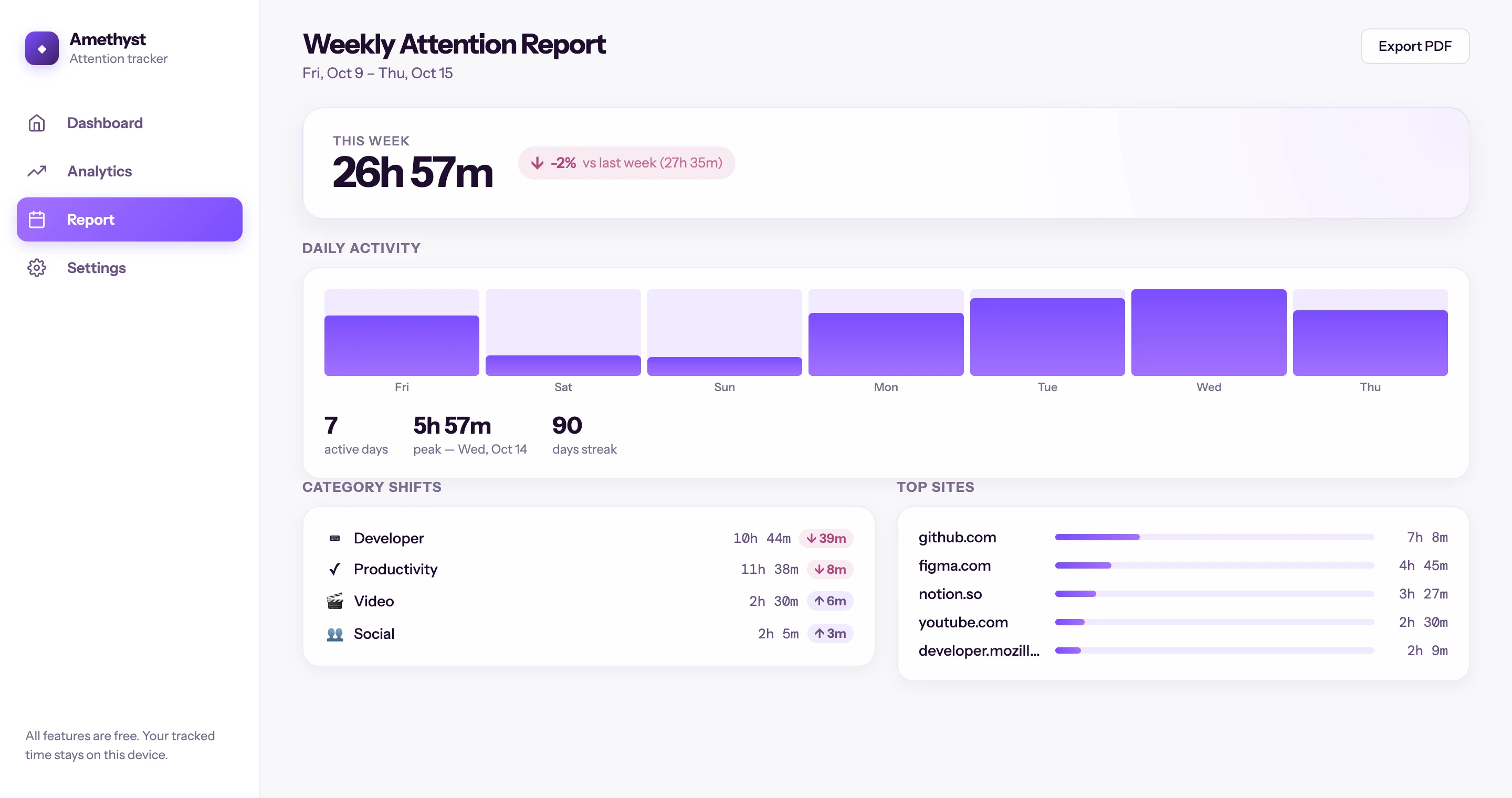
You spend 8 hours in the browser and have no idea where the time went. Amethyst measures active time per website—not tabs open, not history entries—and shows you the answer in a local dashboard that never leaves your device.

No account · No cloud · Completely localView on Chrome →
Zero cloud dataReal privacy
No accountZero friction
Free CSV exportYour data, yours
Amethyst dashboard showing active browsing time by domain

How it works

01

Install and forget

Add the extension. It starts tracking active tab time immediately—no setup, no login, no onboarding.

02

Check the dashboard

Click the toolbar icon to see your top sites, time totals, and trends. Today, 7 days, 30 days, or all-time.

03

Export when you want

Download a CSV of your data to analyze in any tool. Your data stays yours—there is no lock-in.

Product demo

The dashboard where browser time stops feeling vague.

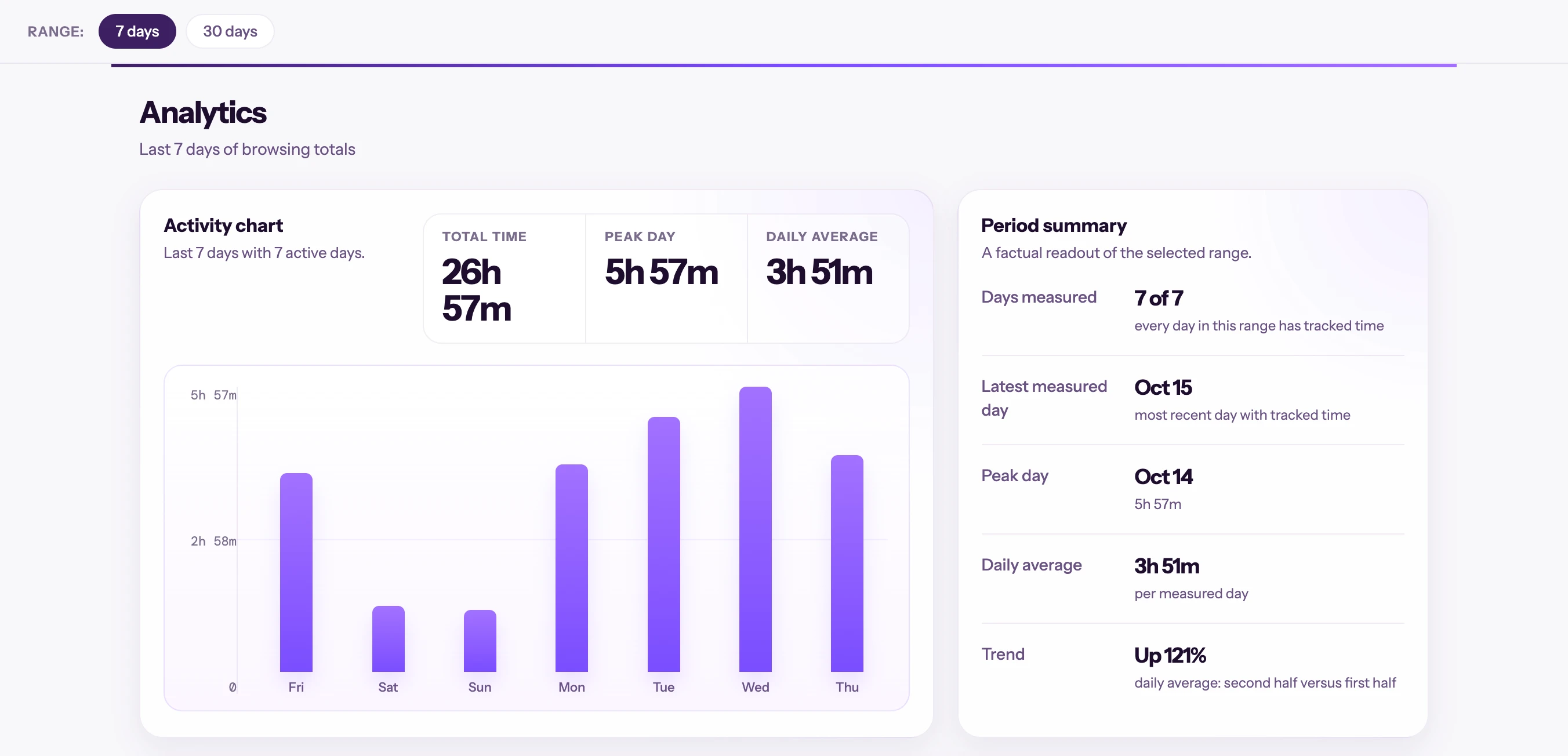
A real analytics dashboard capture: daily activity, totals, average, and period summary so the attention pattern is visible.

  • Shows concrete results before talking about Pro.
  • Explains what the user learns from reviewing their week.
  • Makes the upgrade path toward limits, schedules, and reports visible.
Product demo
Amethyst deep analytics dashboard demo

Use cases

Three moments where Amethyst changes the conversation

It is not just a timer. It gives you a pattern to see, a decision to justify, and a routine to correct with evidence.

Remote work

The browser ate the morning

You bounce between Slack, docs, and LinkedIn. By 2pm it feels like you worked all morning, but you cannot explain where the energy went.

Outcome

Amethyst shows the two secondary sites that quietly drained real hours. You stop correcting by feeling and start correcting by domain.

Study

Feeling busy is not studying

You spend the afternoon across videos, references, and searches, but it is hard to separate real research from elegant distraction.

Outcome

The dashboard makes it obvious how much time went to support material versus the actual task.

Privacy

You want data, not surveillance

You want browser habit data, but not another account, another cloud dashboard, or another company storing your behavior.

Outcome

Amethyst gives you a useful answer without sending anything beyond the browser.

Who it is for

Remote workers

You spend 8+ hours in the browser daily and want a clear answer to "where did my time go?" without installing a surveillance tool.

Students and builders

You want honest web-usage feedback—not aggressive blocking, not gamification, not another app demanding your attention.

Privacy-conscious users

You want browser analytics that stay on your device. No accounts, no cloud, no company profiling your behavior.

No tricks. No account. No cloud.

Compared to the most popular alternative. Amethyst focuses on total privacy and honest time tracking.

Full privacy

Others

Amethyst

No account needed

Others

Amethyst

100% local data

Others

Amethyst

Active time tracking

Others

History only

Amethyst

CSV export

Others

Paid

Amethyst

Pro features

Others

Paid

Amethyst

Available

Free to start. Pro is live.

Track your time free. Unlock Pro when you need limits, scheduling, custom categories, and weekly reports.

FreeFree forever
$0

Everything you need to know where your hours go.

  • Active time tracking by domain
  • Local dashboard with trends
  • Up to 1 active focus limit
  • Unlimited CSV export
  • No account, no login, no cloud
ProMost popular
$39.99/yr

or $4.99/mo · $69.99 one-time

Advanced controls for focus limits, scheduling, custom categories, and weekly reports.

  • Everything in Free
  • Unlimited focus limits
  • Schedules by day and time
  • Up to 20 custom categories
  • Weekly Attention Report
  • Priority support

Your data never leaves your browser.

Free to Pro path

Start by seeing the time. Upgrade when you want to change the pattern.

Amethyst should prove value before asking for payment: free local clarity first, then limits, schedules, and reports once you know what needs control.

Before

The day ends and you only have a vague feeling that browser hours disappeared.

After

You see domains, trends, and categories. Then you decide which limits deserve Pro schedules and reports.

"History tells you what you opened. Amethyst shows what actually held your attention."
Product noteFree for clarity · Pro for control

Privacy

Your browsing data never leaves your device.

  • Time-tracking data is stored locally in Chrome's storage API. No external servers.
  • The extension measures active time using visibility and focus signals—it does not read page content.
  • No accounts, no analytics platform, no data selling. Period.

Amethyst quick answers

Direct answers for people deciding whether Amethyst fits.

More questions? Ask a question on Chrome Web Store

A Chrome extension that tracks active browsing time by website domain and shows the results in a local dashboard.

Browser history shows what you opened. Amethyst measures how long each site actually held your attention.

No. Everything is stored locally in your browser. No cloud, no sync, no accounts.

Yes. CSV export is included and unlimited in the free tier.

Ready to know where your 8 hours go?

Free to install. No account required. Starts tracking the moment you add it.

Install Free

Built and maintained by Orlando Ascanio

Get notified of updates

I ship quietly. Subscribe to hear when something new ships.

No spam. Unsubscribe anytime.

Share this page
Amethyst – See where your browser hours actually go. | Orlando Ascanio