~/schedule.md· macOS 14+ · In development · Local-only
Your schedule is a file. Not an account.
Ask any model for your week, paste the answer into ~/schedule.md, and the app has it a tenth of a second later, list, week grid, reminders, and a compounding curve. Tick something off and the same line is rewritten in the file. The format is small enough that an LLM gets it right zero-shot and strict enough that the parser never guesses.
- 1 file
- The whole database
- 0.1s
- From save to screen
- 0 accounts
- And no network calls
One line, all the way down
- 14:00-15:00
- Start and end. Drop the end for a moment; drop the time for a task on that day.
- Gym
- The title. Everything left once the trailing tokens are taken off.
- #health
- Topic. Groups the sidebar and moves the compounding curve.
- @home
- Location. Free text, only ever read at the end of a line.
- !15m
- Fires 15 minutes before, through Notification Center. Also !1h, !1d, !0.
done is an x in front, or - [x] on a task
Your task manager owns your tasks
The schedule you rely on lives inside somebody else's database, behind an account, an API and a sync service. To let a model write it you need OAuth, tool calls and a integration that breaks on its own schedule. And the day the app shuts down or changes its pricing, the data leaves with it, because you never had a copy you could read.
A schedule is a few dozen lines of text. It should be a file you own, in a format you can read without an app.
One file, two windows
The left window is the whole database. The right one is the app reading it. Both are live: an edit in either lands in the other in about a tenth of a second, because the watcher follows atomic saves, the kind an editor or an AI writing via a temp file makes.
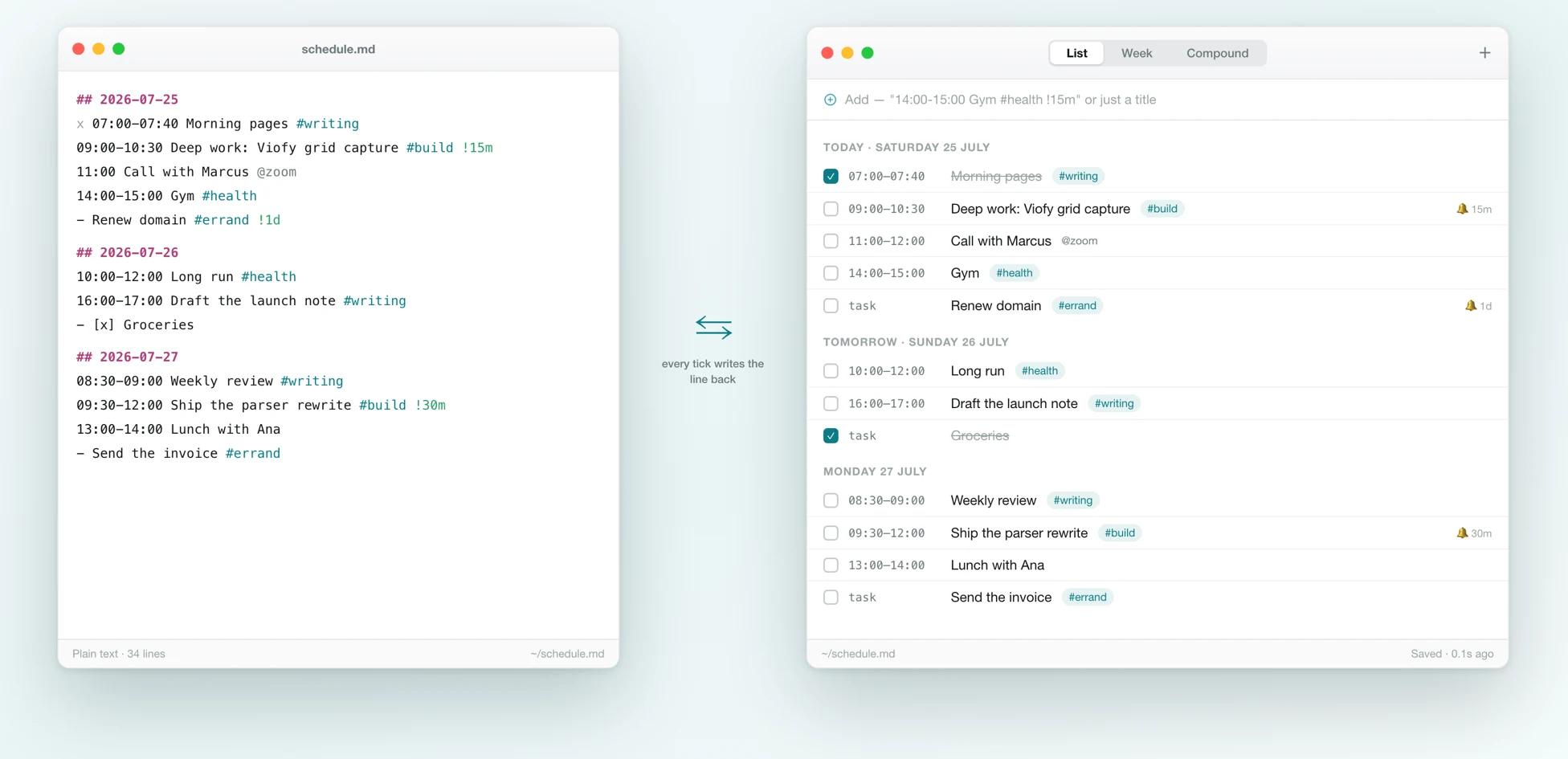
- A ## YYYY-MM-DD header opens the day; timed events and dashed tasks go under it
- #topic, @location and !30m are read only at the end of a line, so titles never break
- Ticking something writes "x " before the event or "- [x]" on the task, no sync layer
What the app adds
The file stays the source of truth. The app is what makes it comfortable to live in day to day.
A quick add that speaks Compound
so you type "14:00-15:00 Gym #health !15m" and get an event, or plain prose and get a task for the day.
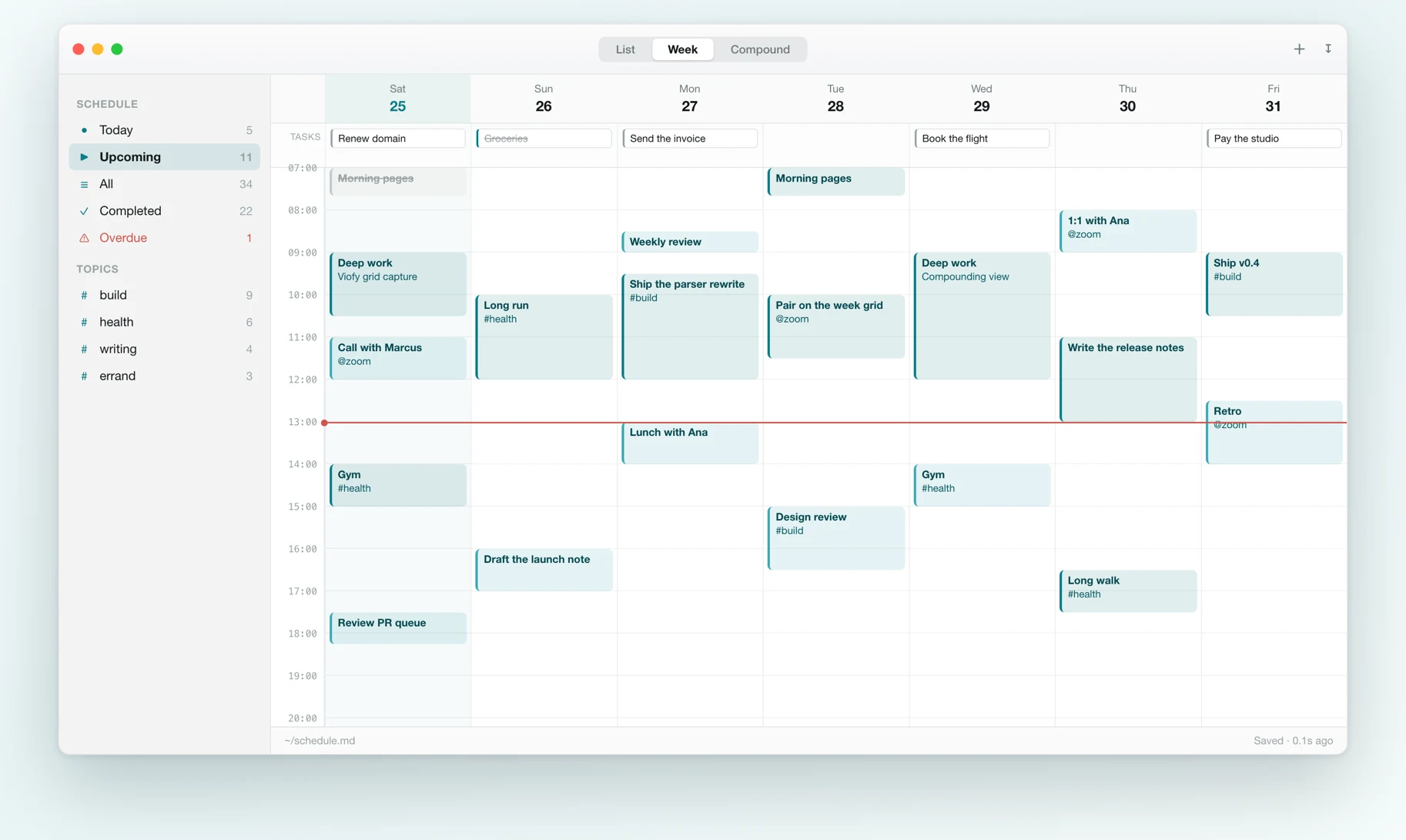
Week grid
seven columns on an hour grid, blocks sized by duration, and a now-line on today.
Local reminders
so !30m, !1h or !1d on any line fires on time, with no notification service in between.
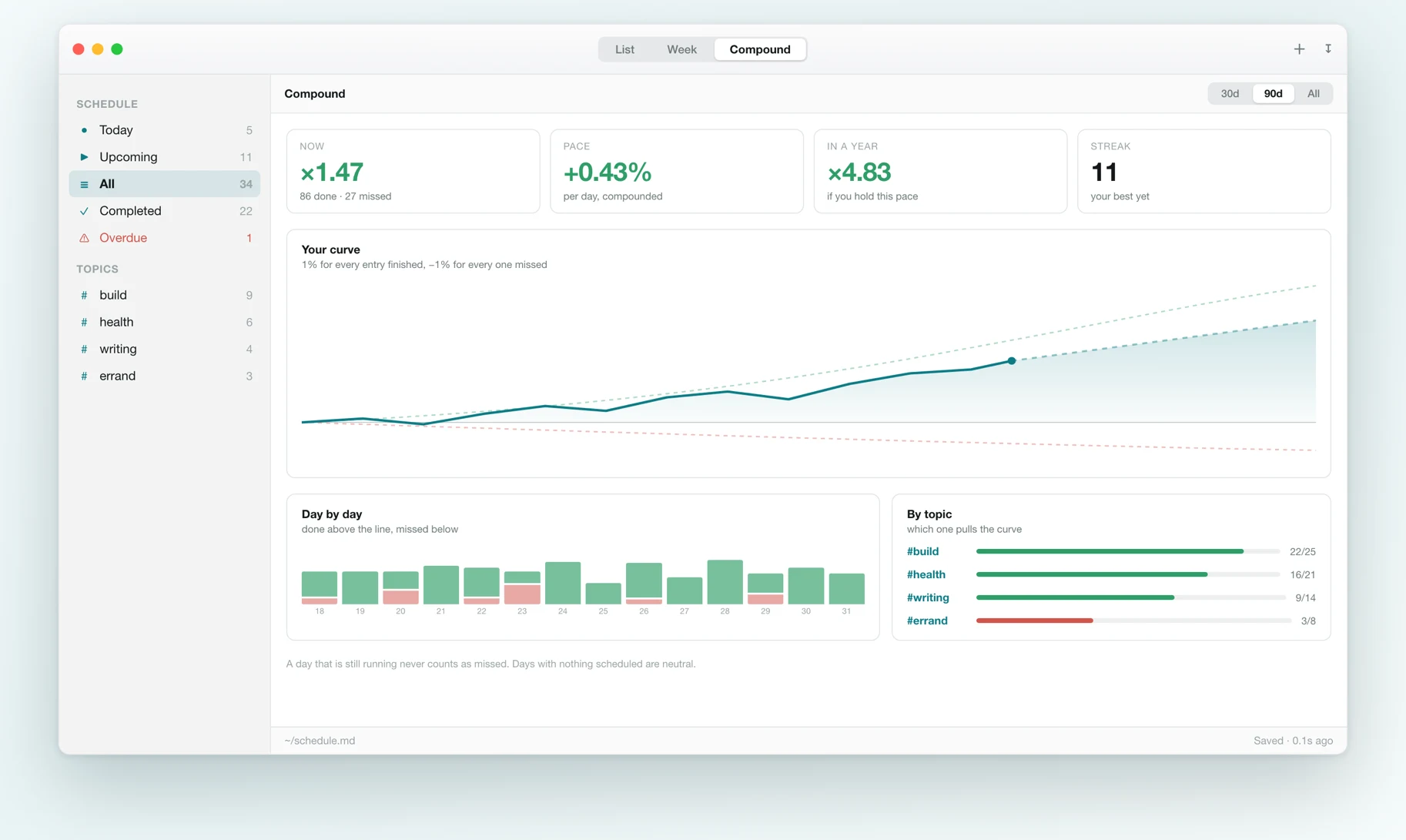
The 1% curve
so you see the compounding of your own file: pace, streak, a one-year projection, and which #topic pulls the curve.
The same line, read three ways
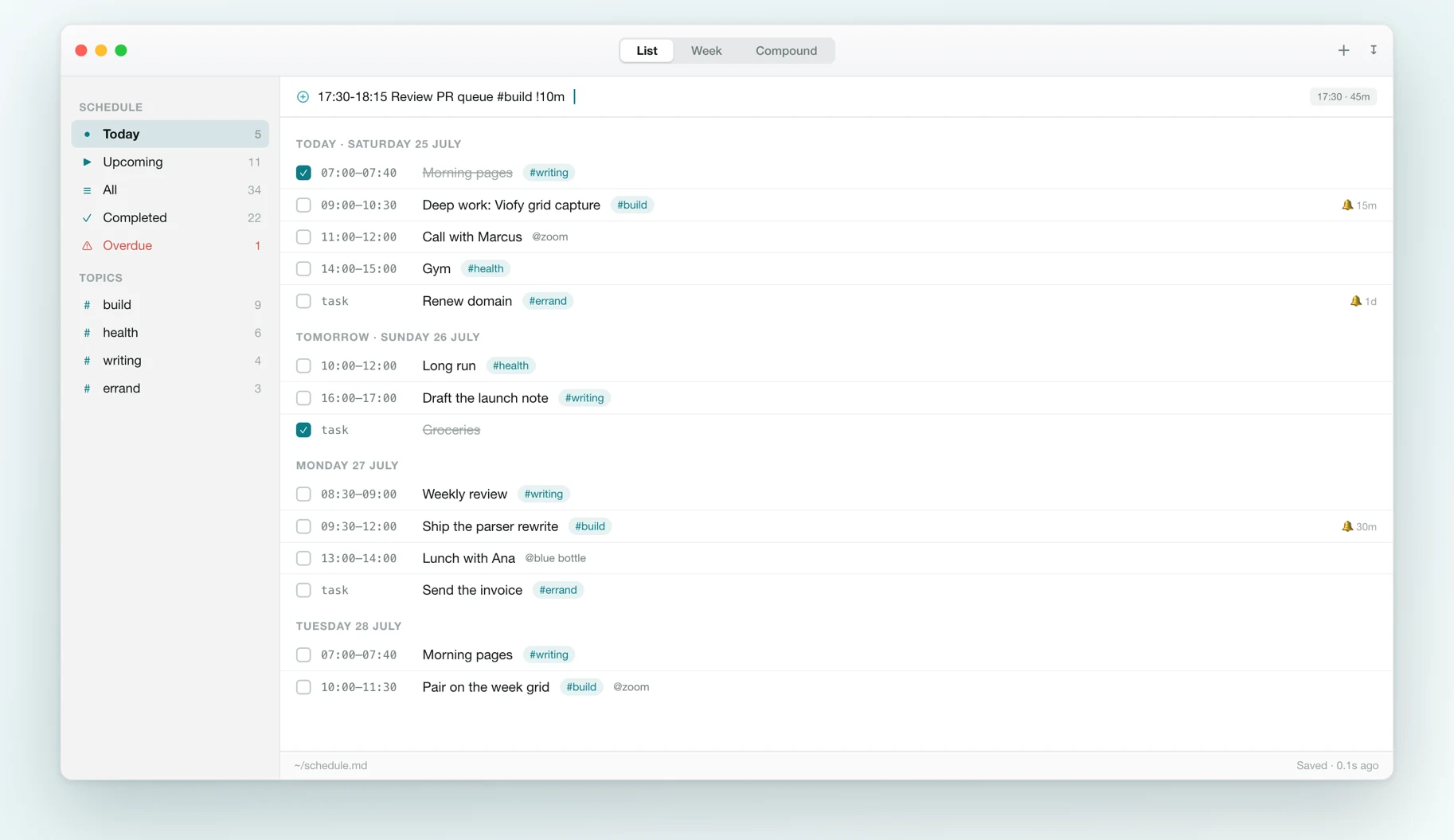
The list is for the day. The week is for seeing where work fits. The compounding view is for whether the month was real.
Everything you need to live in one file
Every feature exists so the file stays sufficient. No accounts, no cloud, no features you would never use.
One file as the database
Plain markdown at ~/schedule.md, readable, greppable, and backed up by whatever already backs up your disk.
0.1s reload
The watcher follows the file and its parent directory, so it catches atomic saves whoever made them.
List, week and topics
Today, Upcoming, All, Completed, an Overdue row, and every #topic in the file with counts.
Compounding view
The ×1.01 / ×0.99 curve over your own entries, with pace, streak and a one-year projection.
Import and export
Drop another .md to merge it without duplicates, and export .ics with VEVENT, VTODO and VALARM.
No network, no account
The app makes no requests. Nothing to sign up for, nothing to sync, nothing to expire.
How it works
Paste the prompt
The Compound spec is nine lines of rules you can paste into any model. Ask for your week and it comes back as plain text, dates, timed events, tasks, tags, locations, reminder leads. No JSON, no schema wrangling.
Save it as ~/schedule.md
That file is the database. The app watches it and reloads about a tenth of a second after any save, yours, your editor's, or an AI writing through a temp file.
Work from the app
List, week grid, quick add, reminders, and the compounding view. Every checkbox, edit and new entry is written back as the same Compound line, so the file never falls behind the UI.
Against a cloud task manager
Who it is for
People who plan with an LLM
You already ask a model to lay out your week. This is the shortest path from its answer to a real calendar, copy, paste, done. No connectors to authorize.
Local-first and plain-text people
You keep notes in markdown and want the schedule in the same place: greppable, diffable, backed up by whatever already backs up your home folder.
Anyone tired of a fifth account
No sign-up, no sync, no subscription that can lapse. The app opens a file on your disk and that is the entire dependency list.
Privacy
There is no server to send anything to.
- The app reads and writes one file on your machine. It makes no network requests, there is no account system, no telemetry and no sync backend.
- Nothing is uploaded when you tick something off. The write goes to the same markdown file the entry came from.
- Reminders are scheduled locally through Notification Center, with an in-app fallback if the system declines an ad-hoc signed build.
Free. And yours.
Compound is built from source. There is no paid tier, no Pro version, and nothing that expires.
$0macOS 14+
Clone the repo, run ./build.sh install, and point the app at your markdown file.
- The whole app: list, week, compound and editor
- Local reminders with !30m, !1h, !1d, !0
- Import by dropping another Compound file on the window
- .ics export from the bundled Python tool
- The format spec, so any model can write it
- 41 tests over the format and the curve
Requires a Swift 5.9 toolchain. There is no notarized download yet.
Compound quick answers
Direct answers for people deciding whether Compound fits how they work.
What is Compound?+
Two things with one name: a schedule format small enough for any LLM to emit correctly zero-shot, and a native macOS app that reads and writes it. The format is a day header (## YYYY-MM-DD) followed by timed events, tasks, tags, locations and reminder leads, nothing else.
Do I need an AI to use it?+
No. The quick-add field parses Compound directly, so "14:00-15:00 Gym #health !15m" becomes an event and plain prose becomes a task. The AI path is what the format is optimized for, not a requirement.
What happens when the app and my editor disagree?+
They cannot for long. The app watches the file and its parent directory, so it picks up atomic saves within about a tenth of a second, and every change it makes is written as the same Compound line. The file is always the source of truth.
Can I get my schedule into a real calendar?+
Yes. The bundled Python tool exports .ics, timed entries as VEVENT, tasks as VTODO, tags as CATEGORIES, reminder leads as VALARM. UIDs are a hash of date, time and title, so re-exporting updates events instead of duplicating them.
What is the compounding view?+
The Atomic Habits curve computed over your own file: every entry you finish is ×1.01, every one you let slip is ×0.99. It shows where you stand, your measured pace, where that pace lands in a year, your streak, and which #topic is pulling the curve which way. A day still in progress never counts as missed.
How do I install it?+
Build it from source: ./build.sh install puts Compound.app in /Applications. It needs macOS 14 or newer and a Swift 5.9 toolchain (the Xcode command line tools). There is no notarized download yet.
Own the file. Let the app be replaceable.
Build it in one command, point it at a markdown file, and keep a schedule that outlives the app showing it.