
Open to SWE / AI Engineering roles — Let's talk
Skip to content
ResistGateInstall free
Chrome Extension · Free to use

You don't unblock distractions.You earn access.

ResistGate adds real friction before blocked sites — a typing challenge you can't shortcut.

+4 early usersTry it and give me your feedback!Rate on Chrome →
FreeTo start
100% privateNo data leaves your device
10 secFriction gate
resistgate popup
Twitter.com is blocked

Type the phrase to continue

What you resist persists. But what you pause on, you own.
57 chars remaining · no paste allowed0%

That's the friction gate. Every distracted reflex feels exactly like that.

Install to break autopilot

How ResistGate works

01

You try to open a blocked site

Click on Twitter, Reddit, or any site in your block list. ResistGate intercepts the request.

02

You hit a typing challenge

A 5-paragraph typing challenge appears. 100% accuracy required, paste disabled, any typo resets progress. 60–90 seconds of effort to decide: is this distraction worth it?

03

You earn 15 minutes of access

Pass the challenge and get temporary access. When the timer expires, the block returns. No permanent disables. No cheating the system.

Product demo

A clear place to show the real product experience.

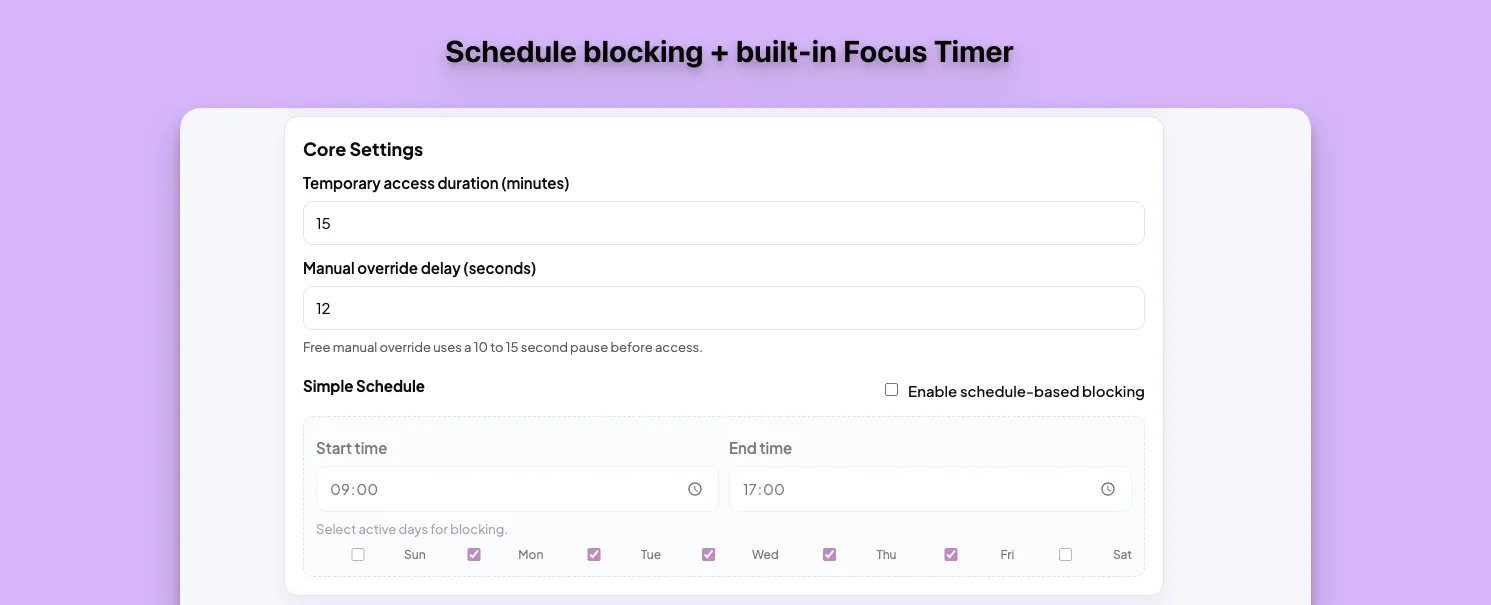
A direct look at how the friction is configured: access duration, override delay, and blocking schedules in one flow.

  • Shows real settings, not just marketing copy.
  • Shows what the user tunes before trusting the blocker.
  • Connects the free value to the Pro discipline tools.
Product demo
ResistGate schedule blocking and focus timer demo

Use cases

When the right friction changes the day

ResistGate works best in specific moments: when you need to cut the reflex, protect a block, or stop negotiating with yourself.

Deep work

I am just going to check one thing

You open X or Reddit in the middle of a demanding task. You did not intend to disappear for twenty minutes; there was just no pause between impulse and tab.

Outcome

The unlock phrase creates the second of lucidity where you decide to go back to work instead.

Study

You need a barrier, not a permanent ban

During a study session, some sites are occasionally useful. A total ban breaks the flow when you truly need them.

Outcome

ResistGate still lets you through, but it makes you earn it. You keep the utility without returning to autopilot.

Discipline

You want to measure whether you are actually resisting

You install a blocker, feel better for two days, and then have no idea whether you are improving or just postponing the problem.

Outcome

The stats and weekly score turn discipline into something visible.

Friction, not walls

ResistGate doesn't lock you out permanently. It adds intentional friction so every visit is a conscious decision. Free tier includes everything you need to break autopilot. Pro adds analytics and discipline tools.

Block distracting sites

Add any site to your block list. Set schedules for work hours and ResistGate enforces them automatically.

  • Unlimited sites in block list
  • Schedule rules by day and time
  • Block the current tab with one click

Typing challenge gate

To visit a blocked site, type a complete phrase with 100% accuracy. The 10-second pause breaks the impulse to browse.

  • Copy-paste is disabled
  • Adjust phrase length to your needs
  • Progress bar shows completion

Temporary access windows

Pass the challenge and get a set time to browse. When the timer ends, the block returns automatically.

  • Choose your access duration
  • Manual override adds a delay
  • No option to disable blocking for the day

Daily resistance tracking

See how many times you resisted visiting blocked sites today. Track your streak over time.

  • Track resistance per site
  • Toolbar badge shows daily count
  • Built-in focus timer

Blocking & Access

  • Unlimited domain blocking
  • Schedule-based blocking
  • Temporary access with timer
  • Manual override with delay
  • Block current tab instantly

Friction Challenges

  • Typing challenge gate
  • Multi-layer behavioral frictionPro
  • Intention page with breathingPro
  • Temptation bundlesPro

Analytics & Tracking

  • Daily resistance badge
  • Focus and work timer
  • Resistance counters per site
  • Focus analytics dashboardPro
  • Weekly Focus Score 0–100Pro

Strict Mode

  • Strict mode with lockPro
  • Override cooldown systemPro
  • Commitment mode 1–24 hoursPro
  • Accountability presetsPro
  • Earn-access bonus minutesPro

Who it is for

Developers

You open Hacker News "while tests run" and lose 20 minutes. ResistGate adds a 10-second typing cost to every tab switch—just enough time to remember what you were actually doing.

Students

You sit down to study and check Reddit "just for a second." ResistGate keeps the barrier up so your scheduled study time stays protected.

Writers

Deep work requires long unbroken blocks. The moment you switch tabs between sentences, you lose the thread. ResistGate puts a deliberate cost on every context switch so the session stays intact.

Remote workers

No manager watching means your focus is entirely on you. ResistGate replaces the office structure with intentional friction—making it harder to drift than to stay on task.

Built for intentional browsing

Compared to the most popular alternative. ResistGate focuses on intentional friction, not absolute blocking.

Blocks distracting sites

Cold Turkey

ResistGate

Complete lockout mode available

Cold Turkey

ResistGate

Typing challenge before access

Cold Turkey

ResistGate

Temporary access windows

Cold Turkey

Limited options

ResistGate

Configurable duration

Schedule-based blocking rules

Cold Turkey

ResistGate

Analytics per blocked site

Cold Turkey

ResistGate

Weekly discipline scoring

Cold Turkey

ResistGate

Cooldown period to disable blocking

Cold Turkey

ResistGate

Behavioral friction presets

Cold Turkey

ResistGate

Commitment mode for 1 to 24 hours

Cold Turkey

ResistGate

Works without creating an account

Cold Turkey

ResistGate

Core blocking features free

Cold Turkey

Limited free tier

ResistGate

Choose your plan

Focus analytics, strict mode, and weekly reports for those who want serious discipline.

MonthlyFlexible
$3.99/month

Full Pro access. Cancel anytime.

  • Everything in Free
  • Strict mode with disable cooldown
  • Progressive override cooldown system
  • 7-day focus analytics dashboard
  • Weekly Focus Score from 0 to 100
  • Weekly discipline summary report
YearlyRecommended
$29.99/year

Best value. 2 months free vs monthly. Recommended.

  • Everything in Free
  • Strict mode with disable cooldown
  • Progressive override cooldown system
  • 7-day focus analytics dashboard
  • Weekly Focus Score from 0 to 100
  • Weekly discipline summary report
  • Bonus minutes for earning access
LifetimeOne-time
$49.99

Lifetime access. One-time payment. For power users.

  • Everything in Free
  • Strict mode with disable cooldown
  • Progressive override cooldown system
  • 7-day focus analytics dashboard
  • Weekly Focus Score from 0 to 100
  • Weekly discipline summary report

If you want something you can easily disable, this is the wrong extension.

Free to Pro path

Start with free friction. Upgrade when you need harder limits.

The decision does not have to happen today. Install the blocker, see whether it breaks autopilot, then come back for Pro when you want analytics, strict mode, and weekly reports.

Before

Twitter, Reddit, or YouTube opens on reflex. You close the tab, then reopen it minutes later.

After

Every visit asks for intention: typing challenge, temporary access, and a clear signal of how often you resisted.

"The valuable moment is not the block. It is the pause where you decide whether the distraction is actually worth it."
Product noteFree core · Pro for serious discipline

Privacy-first

No data selling. No invasive tracking. No third-party pixels.

  • Your focus data stays entirely inside your browser. Nothing is uploaded to any server.
  • ResistGate runs entirely on your device. No external accounts, no cloud storage, no tracking.

ResistGate quick answers

Direct answers for people deciding whether ResistGate fits.

More questions? Ask a question on Chrome Web Store

A Chrome extension that blocks distracting sites and makes you type a phrase to access them. It forces a 10-second pause so you browse with intention, not impulse.

Most blockers lock you out completely or let you disable them in two clicks. ResistGate keeps sites accessible but adds a deliberate cost to every visit—a typing challenge that breaks the autopilot habit.

All core blocking features: unlimited site blocking, typing challenges, temporary access timers, schedule-based rules, daily resistance tracking, and a focus timer. Everything you need to stop mindless browsing.

Analytics dashboard, weekly Focus Score, discipline reports, strict mode with cooldown, commitment mode for deep work, and accountability presets. Pro is $3.99 per month, $29.99 per year, or $49.99 lifetime.

Yes. Blocking, typing challenges, scheduling, timers, and resistance tracking are completely free. Pro adds analytics and advanced discipline tools starting at $3.99 per month.

No. Everything stays local in your browser. No accounts, no servers, no tracking. Your data never leaves your device.

If you want something you can easily disable, this is the wrong extension.

But if you're looking for real friction—a system you can't cheat—then ResistGate is exactly what you need.

Install Free

Built and maintained by Orlando Ascanio

Get notified of updates

I ship quietly. Subscribe to hear when something new ships.

No spam. Unsubscribe anytime.

Share this page
ResistGate – You don't unblock distractions. You earn access. | Orlando Ascanio